
Definition of a WordPress Membership Plugin
A membership plugin is a tool that turns a regular WordPress website into a gated platform.
It lets you decide who can access specific content, features, or areas of your site. Some users may have free access. Others may need to pay. Different members can see different things depending on their membership level.
Learn more through the Membership Business Model Glossary
At its core, a membership plugin controls access and automatically manages users.
Instead of manually approving members, tracking payments, and locking content manually, the plugin handles everything in the background.
Membership plugins are used for:
- Online courses
- Premium content websites (Paywalls)
- Private communities
- Business directories
- Coaching programs
- Subscription-based services
If you want recurring revenue, controlled access, or a private member experience, you need a membership system.

What Does a Membership Plugin Actually Do?
A membership plugin usually handles four main things:
1. Content Restriction
It lets you control which pages, posts, downloads, and/or sections are visible to each member type.
2. Membership Levels
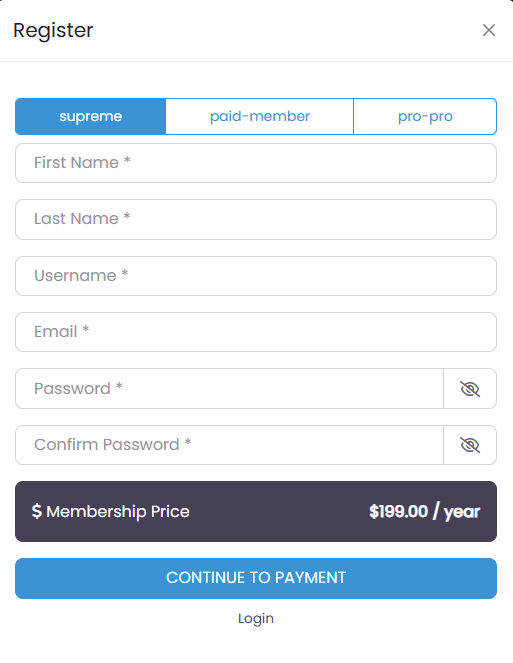
It allows you to create different access tiers, such as Free, Pro, or VIP.
3. Payments and Subscriptions
It connects to payment gateways and manages one-time payments or recurring billing. The UsersWP Membership plugin requires its free sister plugin, called GetPaid, to handle payments and subscriptions. (Learn more about the difference between Membership plugins and Subscriptions plugins)
4. Member Management
It automatically upgrades, downgrades, renews, or cancels access based on payment status.
If you want a deeper look at the technical flow, read our full breakdown of how membership plugins work.
Why Businesses Use Membership Plugins
Membership plugins help you:
- Generate recurring revenue
- Build private communities
- Deliver exclusive content
- Control user permissions
- Automate payments and renewals
- Scale without adding manual work
Instead of relying on ads or one-time sales, you create a predictable income.
Types of Membership Models
Not all membership sites are the same.
Some charge a monthly subscription.
Others charge per article.
Some unlock content for a limited time.
Others sell lifetime access.
Some use tiered pricing.
Many combine free and paid access.
Each model has pros and cons depending on what you sell.
If you want to explore them in detail, see our guide on types of membership business models.
Essential Features to Look For
Not all membership plugins are built equally.
The most important features usually include:
- Flexible content restriction
- Multiple membership levels
- Reliable payment integration
- Upgrade and downgrade support
- Email notifications
- Reporting and analytics
- Scalability and performance
We cover these in detail in our guide to essential features of a membership plugin.
Common Challenges With Membership Sites
Running a membership site is powerful, but not an automatic success.
Common issues include:
- High churn
- Payment failures
- Poor onboarding
- Weak engagement
- Overcomplicated pricing
We break down these mistakes and how to avoid them in our membership site challenges guide.
Choosing the Right Membership Plugin
Some plugins focus on advanced features.
Some focus on simplicity.
Some are built for WooCommerce stores.
Others are lightweight and role-based.
If performance and flexibility matter, UsersWP Membership Plugin is a lightweight and scalable option that integrates directly with WordPress roles and avoids unnecessary bloat.
The best plugin depends on your business model, technical comfort level, and long-term goals.
Final Considerations
A membership plugin is the foundation of any WordPress membership website.
It controls access, manages payments, automates renewals, and keeps your business organized.
With the right setup, you can build predictable revenue, a loyal community, and a scalable system that grows with your site.
If you are ready to build a fast and flexible membership site, explore the UsersWP Membership Plugin and see how it fits your business model.
Buy UsersWP Membership Plugin for WordPress
Or subscribe for a full membership that gives you access to the membership plugin along with all other UsersWP extensions, including:
- User Moderation Tool to control new user registrations.
- Private Messages Add-on for direct member communication.
- Front-End Post Add-on to let users submit content from the frontend.
- Advanced Search for better user filtering and discovery.
- And many more tools to enhance your membership site.
Start building your membership site with UsersWP today and give your users a seamless, high-performance experience.