What is a Membership Plugin?
Definition of a WordPress Membership Plugin
A membership plugin is a tool that turns a regular WordPress website into a gated platform.
It lets you decide who can access specific content, features, or areas of your site.
Some users may have free access.
Others may need to pay.
Different members can see different things depending on their membership level.
Learn more through the Membership Business Model Glossary
At its core, a membership plugin controls access and automatically manages users.
Instead of manually approving members, tracking payments, and locking content, the plugin handles everything in the background.
Membership plugins are used for:
- Online courses
- Premium content websites (Paywalls)
- Private communities
- Business directories
- Coaching programs
- Subscription-based services
If you want recurring revenue, controlled access, or a private member experience, you need a membership system.
What Does a Membership Plugin Actually Do?
A membership plugin usually handles four main things.
1. Content Restriction
It controls which pages, posts, downloads, videos, and individual sections of a page are visible to each type of member.
The granularity matters.
Some sites lock entire pages behind the paywall.
Others show free previews with members-only sections below.
Others restrict only specific files or comment threads.
A good membership plugin handles all three patterns.
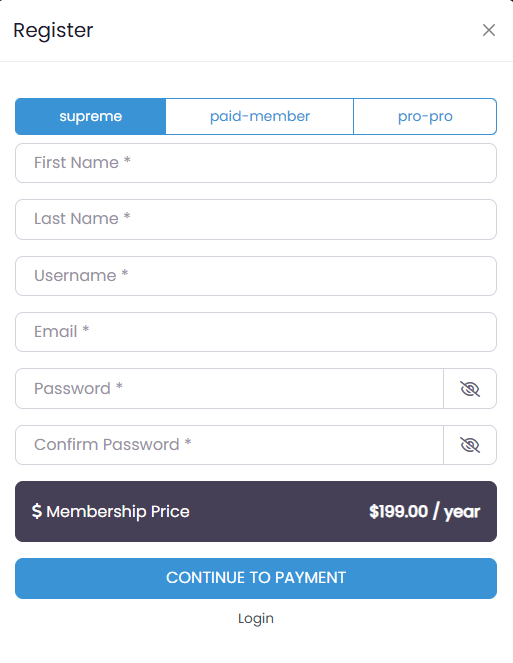
2. Membership Levels
It lets you define different access tiers, typically free, paid, and a premium tier on top.
Each level can have its own pricing, its own content access, and its own onboarding flow.
Levels are what enable upsells and tier-based engagement strategies.
Without them, every paying member has to be treated identically.
3. Payments and Subscriptions
It connects to payment gateways and handles both one-time payments and recurring billing.
Some plugins bundle the payments layer in.
Others, including UsersWP, keep payments separate to avoid bloat.
UsersWP uses its free sister plugin GetPaid to handle subscriptions, invoicing, tax compliance, and gateway connections.
The architectural separation matters because it means the membership plugin stays lightweight, and the payment stack only loads when payments are actually happening.
For a fuller breakdown of where the line between membership and subscription functionality sits, see our membership vs subscription plugin comparison.
4. Member Management
It automatically promotes, demotes, renews, and cancels member access based on payment status, expiry dates, and rules you define.
Done well, you forget it exists.
Done poorly, you spend your weekends fixing access for paid members who got locked out by a bug.
If you want a deeper look at the technical flow, read our full breakdown of how membership plugins work.
Why Businesses Use Membership Plugins
The reason businesses adopt membership plugins is predictable income.
Instead of one-time sales or unstable ad revenue, you build a base of paying members who renew month after month.
Around that core, the same plugin lets you build private communities, deliver exclusive content, control who sees what, automate billing and renewals, and scale the operation without hiring someone to manually approve every signup.
For a small operator, this is the difference between a side project and a real business.
For a larger site, it is the difference between scrambling for revenue and building on a stable foundation.
Types of Membership Models
Membership sites come in many shapes.
The most common is the monthly or annual subscription, where members pay a recurring fee for ongoing access to content or community.
Other sites charge per article, per course, or per download, treating each piece of content as a separate purchase.
Some unlock content for a limited window and then re-lock it.
Others sell lifetime access in a single payment, betting that long-term value outweighs the loss of recurring billing.
Tiered pricing is common in mature sites, where a free tier handles top-of-funnel acquisition, a mid tier covers most members, and a premium tier captures the buyers who want everything.
The right model depends on your content type, your audience, and how often you can credibly add value.
We cover the trade-offs of each in detail in our guide to types of membership business models.
Essential Features to Look For
Not every plugin in this category does the same thing well.
The features that matter most are flexible content restriction at the page, post, and block level, support for multiple membership tiers with different rules per tier, and payment integration that handles failed payments, prorations, and tax compliance correctly.
Upgrade and downgrade flows that change member access cleanly without manual intervention.
Email notifications for the events that actually matter: welcome, renewal, payment failure, cancellation.
Reporting that tells you what is happening with members and revenue.
And the one that often gets overlooked, scalability.
A plugin that works with 100 members can collapse at 10,000 if its architecture is wrong.
We go deeper on each of these in our breakdown of essential features of a membership plugin.
Choosing the Right Membership Plugin
The membership plugin market splits into a few camps.
Some plugins try to do everything: membership, payments, courses, forums, affiliate tracking, all in one package.
Others focus on simplicity and do one thing well.
Some are built around WooCommerce and inherit its strengths and weaknesses.
Others, like UsersWP, are lightweight and role-based, integrating directly with WordPress core user roles and adding only what is genuinely needed for membership management.
After more than 15 years building WordPress products, my honest opinion is that role-based and lean is the right architecture for 95% of membership sites.
The bloat in all-in-one plugins is the most common cause of slow checkouts, conflicts with other plugins, and frustrated users.
Most sites just need clean access control, reliable payments, and the freedom to add whatever else they need from focused tools.
The right choice depends on your business model, your comfort with technical setup, and where you want to be in two years.
For a full comparison of how the main options stack up, see our guide to the best WordPress membership plugin.
Final Considerations
A membership plugin is the foundation of any membership website.
It controls access, handles payments, automates the boring administrative work, and turns a regular WordPress site into a system that runs itself.
Get the foundation right and the rest of the work becomes building content and serving members.
Get it wrong and your time goes to fighting your own setup.
If you want a lightweight, role-based membership solution that integrates cleanly with WordPress and does not slow your site down with features you do not need, the UsersWP Membership Plugin is built for exactly that use case.
It works with our free GetPaid plugin for the payment side, and stays out of your way the rest of the time.
