Best WordPress User Profile Plugin (For Most People): Why Lightweight Beats Bloated
Most “best WordPress user profile plugin” guides recommend bloated all-in-one platforms.
BuddyPress with its full social network feature set, BuddyBoss with its $228/year hosted ecosystem, Ultimate Member with its labyrinth of premium add-ons.
All three are good software for the operators who actually need them.
Most operators do not.
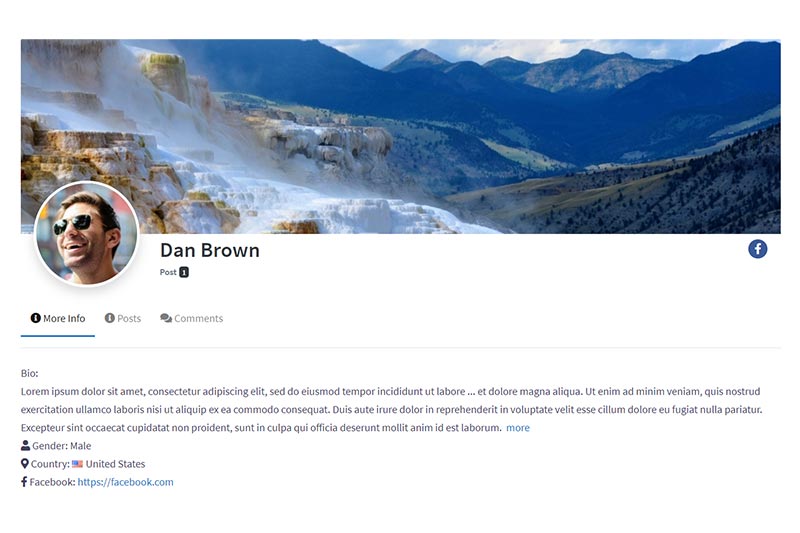
What the vast majority of WordPress sites need from a user profile plugin is straightforward: a front-end registration form, a login page, a member account page where users can edit their info, a public profile page, password recovery, and ideally a members directory.
That is it.
Everything else is feature bloat you will pay for in license fees, performance overhead, and setup time you could have spent building the actual product behind the profiles.
This post is the honest comparison of seven WordPress user profile plugins, the framework for matching the right tool to the actual job, and the case for why the simplest path is almost always the right one.
A Note On How We Got Here
UsersWP exists because of a specific architectural choice we made on GeoDirectory V2.
The original GeoDirectory plugin (2014 to 2019) included login, registration, and basic profile features as part of the core directory plugin.
It worked, but every time a customer asked for profile customization or a better registration experience, we had to add features to GeoDirectory itself.
The directory plugin started growing into territory that belonged in a dedicated user management plugin.
For GeoDirectory V2, we made the call to remove login, registration, and profiles from the core entirely.
UsersWP became the dedicated user management plugin, GeoDirectory stayed focused on listings, and the two now work together cleanly when a directory site needs both.
This architectural split is the same logic behind why UsersWP stays lightweight while doing one job well, instead of growing into a social network or a membership platform like its competitors did.
What “User Profile Plugin” Actually Means
The category has fractured into several different product types over the past decade, all marketed as “WordPress user profile plugins.”
Three distinct categories worth separating:
Pure User Profile Plugins
Registration, login, profile pages, account management, members directory.
This is the original meaning of “user profile plugin” and what most operators are looking for.
UsersWP, Profile Builder, and WP User Manager fall in this category.
Social Network Plugins
Activity feeds, friendships, groups, messaging, forums, notifications.
BuddyPress and BuddyBoss live here.
If your business is “build a community” rather than “let users register and have profiles,” social network plugins are the right category.
Membership-First Plugins
Built around paid subscriptions, content restriction, and tiered access.
ProfilePress and Ultimate Member are the dominant ones, though both bundle profile features with full membership systems.
If you are building a paid membership site, see our best WordPress membership plugin guide for the membership-specific comparison.
The mismatch most operators make is picking a Social Network or Membership-First plugin when they actually need a Pure User Profile plugin.
The result is a bloated stack handling features the operator never uses, slowing down the site and complicating the setup.
What to Look For in a User Profile Plugin
Features that separate a serious profile plugin from a partial solution:
- Front-end registration form with custom fields per user type
- Front-end login page (not the default wp-login.php)
- Public profile pages that index in Google for member SEO
- Editable account page with custom field support
- Password recovery and reset pages that match your site’s design
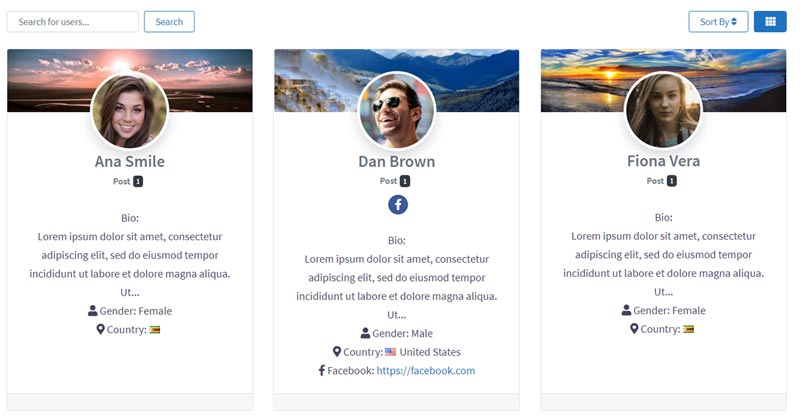
- Members directory with search and filtering
- Avatar upload (not just Gravatar)
- Profile visibility controls (public, members-only, private)
- Page builder compatibility (Elementor, Bricks, Beaver Builder, Divi)
- Multilingual support (WPML compatibility for global sites)
- Newsletter and CRM integration for onboarding flows
A plugin missing more than two or three of these is built for a narrower use case than a serious operator needs.
The Comparison Table
Seven WordPress user profile plugins in 2026, sorted by category and total annual cost.
| Plugin | Category | Starting Price year 1 | Best For |
|---|---|---|---|
| BuddyPress | Social Network | Free | Free social network builds |
| UsersWP | Pure User Profile | Free, or $49/year single site | Lightweight profile setup, member-only directories |
| Profile Builder (Cozmoslabs) | Pure User Profile | Free, or $69/year Hobbyist | Simple profile builds on a budget |
| Ultimate Member | Membership-First | Free + premium add-ons from $99 | Sites that bundle profiles with memberships |
| ProfilePress | Membership-First | Free, or $129/year Standard | Profile-plus-membership operators |
| WP User Manager | Pure User Profile | Free, or $149/year Personal | Mid-market sites with custom field needs |
| BuddyBoss Platform | Social Network | Free + $228/year Pro | Community-first sites with budget for app + hosting |
The second column is the one that matters most.
Pick the wrong category and you pay in license fees, in performance, in setup time, and in feature bloat you will never use.
The Pure User Profile Plugins
UsersWP
UsersWP is the free WordPress user profile plugin built by our team at AyeCode Ltd, in continuous development since 2017.
Active on 20,000+ websites.
On activation, UsersWP automatically creates all the pages a member-facing site needs: Register, Login, Account, Profile, Password Recovery, Change Password, Reset Password, Users Directory, and User Profile Item page.
The architectural difference from competitors is in what UsersWP intentionally does not do.
It does not behave like a social network out of the box (friendships and groups are available as opt-in add-ons for sites that need them, not always-on features that load on every page).
It is not a membership platform (no built-in subscriptions or content restriction in the free core).
It is a focused user profile system that pairs cleanly with other plugins when you need additional capabilities.
Add the free UsersWP Membership add-on for paid content restriction and subscriptions (paired with GetPaid for the payments side).
Add the free GeoDirectory for directory functionality.
Add the UsersWP Friendship, Groups, or Private Messages add-ons when you need community features, or pair UsersWP with bbPress for forums.
The free core handles every Gutenberg block, shortcode, and widget you need for profile-related output, customizable through any major page builder (Elementor, Bricks, Beaver Builder, Divi, Fusion).
WPML is officially supported for multilingual builds (Polylang is not).
The paid Membership bundle at $49/year for a single site includes every premium UsersWP add-on (moderation, reCaptcha, profile progress, real-time notifications, content restriction, private messaging, bbPress integration, and more).
Profile Builder by Cozmoslabs
Profile Builder is the most popular dedicated profile plugin in the WordPress repository, with over 70,000 active installations.
Built by Cozmoslabs, an established Romanian WordPress development team known for Translatepress and Paid Member Subscriptions.
The free version handles front-end registration, login, account, and recover password pages with reasonable defaults.
The Hobbyist plan at $69/year unlocks email confirmation, custom redirects after login, and a few additional field types.
Pro at $149/year and Agency at $249/year add multi-step registration forms, content restriction, social login, and email customizer.
Strong choice for operators who want a no-frills profile setup with the option to add features modularly.
The trade-off is that Profile Builder’s free core is more limited than UsersWP’s; features like the public profile page require the paid tiers.
WP User Manager
WP User Manager is a mid-market profile plugin focused on developer flexibility and custom field handling.
The free version handles the basics.
Personal at $149/year, Plus at $179/year, and Agency at $349/year add custom fields, group memberships, content restriction, and more advanced directory features.
WPUM is well-built and developer-friendly, but the entry point at $149/year for what is essentially a profile plugin is steep compared to UsersWP’s $49 bundle or Profile Builder’s $69 Hobbyist tier.
Best for operators who need the specific WPUM feature set and have the budget to match.
The Social Network Plugins
BuddyPress
BuddyPress is the original WordPress social network plugin, in continuous development since 2008 and now part of the official WordPress.org plugin team’s portfolio.
Completely free, with over 100,000 active installations.
Includes user profiles, activity streams, friendships, groups, private messaging, and forums.
The strength is the comprehensive social feature set at no cost.
The trade-off is that BuddyPress is a heavy plugin even when you only use the profile features.
Installing BuddyPress to get user profiles is like installing WooCommerce to sell one digital download.
The activity stream, group, and friendship systems all run regardless of whether you use them, which adds database queries and frontend load to every page.
Use BuddyPress when your business is “build a community” and the social features are core to the product.
Skip it when you only need profiles.
BuddyBoss Platform
BuddyBoss is the commercial alternative to BuddyPress, originally launched as a premium BuddyPress theme and now a full social network platform with its own codebase.
The BuddyBoss Platform plugin is free.
The full BuddyBoss ecosystem (Theme, Pro features, mobile app, hosted infrastructure) runs from $228/year for the basic Pro bundle to several thousand dollars per year for the full app + hosting package.
The product is polished, the UI is more modern than vanilla BuddyPress, and the mobile app option is unique in this market.
Use BuddyBoss when you are building a community-first business with budget to support the platform investment.
For operators who only need profile features, BuddyBoss is dramatically overpowered (and overpriced).
The Membership-First Plugins
Ultimate Member
Ultimate Member is one of the most popular profile-plus-membership plugins, with over 200,000 active installations.
The core plugin is free and handles registration, login, profiles, members directory, and basic role management.
Premium add-ons (social activity, private content, MailChimp integration, WooCommerce, bbPress, etc.) sell individually starting at $99/year or as bundles up to $348/year.
The architectural shape is everything-in-one: profiles, social features, role management, and content restriction all in the same plugin family.
This is a strength for operators who want one vendor for everything and a weakness for operators who want each function to be modular and replaceable.
For a pure profile setup, Ultimate Member is heavier than necessary.
ProfilePress
ProfilePress repositioned itself as a full membership platform a few years ago, after starting as a profile and login form builder.
The current product handles registration, profiles, paid memberships, subscriptions, and content restriction in one plugin.
Free core, with paid tiers at Standard $129/year (1 site), Plus $299/year (3 sites), and Agency $499/year (unlimited).
If you are building a paid membership site and want everything in one place, ProfilePress is worth shortlisting alongside the membership-specific plugins we cover in our best WordPress membership plugin guide.
If you only need profile features without the membership infrastructure, ProfilePress is paying for features you will not use.
Where UsersWP Wins
UsersWP is built specifically for operators who need user profiles done well and nothing more.
The core philosophy: ship the registration form, the profile page, the account page, the members directory, the login page, and the password recovery flow.
Activity feeds, friendships, groups, messaging, content restriction, and subscriptions sit in opt-in add-ons or paired plugins rather than the always-on core.
Install only the pieces you actually need.
The trade-offs you get from that focus:
- The plugin stays small and fast (no activity stream queries on every page load)
- Customization is straightforward because the surface area is small
- Pricing reflects the focused scope ($49/year for the full bundle, not $228/year for a social platform you do not need)
- Page builder compatibility works out of the box because there are fewer custom templates to override
- The plugin integrates cleanly with other plugins for features it deliberately does not include (BBPress for forums, GeoDirectory for directories, GetPaid for payments)
Architectural minimalism is the strategy.
Same logic we applied when separating UsersWP from GeoDirectory in 2019.
The Practical Path
The best WordPress user profile plugin for most operators is the one that handles user profiles as a first-class capability without dragging in features you will never use.
The free UsersWP plugin ships everything most operators need on activation.
Registration form, login page, account page, public profile pages, password recovery, members directory: all included, all free, all automatically created when the plugin activates.
The UsersWP Membership bundle at $49/year for a single site adds every premium add-on (moderation, reCaptcha, profile progress, notifications, content restriction, private messaging, bbPress integration) for less than most competitors charge for a single feature.
For step-by-step build guidance, see our tutorial on how to create a WordPress user registration form.
For the deeper membership conversation, see our guides to the best WordPress membership plugin for most people and the difference between membership and subscription plugins.
For the paywall build itself, see our step-by-step paywall tutorial.
Final Thoughts
A user profile plugin is one piece of a complete WordPress site.
Pick a heavy plugin and you are paying in license fees, in performance, in setup time, and in feature bloat you will never use.
Pick a lightweight plugin and you ship the profile feature this afternoon, with budget and bandwidth left over for the actual product behind the profiles.
The free UsersWP plugin is built for that second path, has been in continuous development since 2017, and stays out of your way as the site grows from a small project into a real business.
Start with the free version.
Add the $49 bundle when you actually need one of the premium add-ons.
Keep the rest of your stack focused on the product behind the profiles.

Glenn
everything you guy’s do are quality, well thought of and very trusted from us who use your plugins from around the globe.
Look forward to the updates!!!
Alice
I thought that BuddyPress is the only solution to create user profile until reading this article. Thanks
Danial
I have a multi-vendor store and I am using YITH WooCommerce Multi Vendor plugin on my website. But I am having an error while configuring the user profile with the plugin.
Is it possible that two plugins can conflict with each other? Or should I use another Multi-vendor plugin?
Thanks.
Paolo
HI, please check this with support, we should be able to fix any conflict with the plugin of your choice.
Thanks
Danial Ashrafi
Thank you for your response.
Adam
Which hosting do you use on your WordPress website?
I have an eCommerce store with Siteground, but I don’t know why but their service and support nowadays are very pathetic, and I need to change my hosting company to any other cloud provider.
Do you have any experience with Cloudways WooCommerce hosting?
Paolo
We are hosting on a dedicated server that we maintain. We also have a couple of websites on Siteground and we can’t really complain.
Cloudways is a host that we used a few years ago and we were quite happy with them too. I heard that the latest technology they are using is top-notch.
I hope this helps
Enrique
Hi!
I’ve installed the plugin, it’s great! Only one thing I can’t find and I’m asking for help.
I need to redirect to other page (not the main/login one) all users that log in.
It is possible?
Thanks you folks!
Paolo
Hi,
the option to do that is available on UsersWP > Login > Login Redirect Page
Please next time submit your support requests through this form: https://userswp.io/support/
Thanks,
Enrique
Thanks you Paolo and excuse me, other sopport requests I will send it via support link.